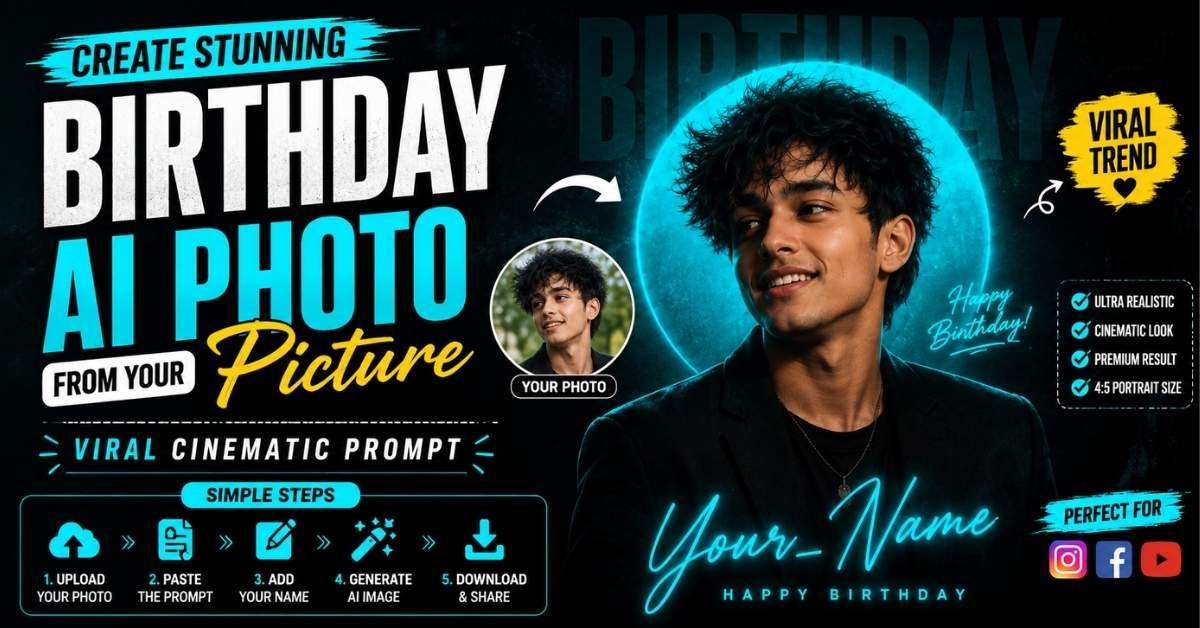
Want to create a stylish birthday portrait like the trending AI images you see on Instagram and YouTube Shorts? You can create this type of cinematic birthday poster using an AI image generator and a good text prompt. The process is simple, even if you have never created an AI photo before. Just upload your photo, add the right prompt, generate the image, and download the result. Below is a complete step-by-step guide along with the ready-to-copy AI prompt.
Create an AI Birthday Image in 5 Simple Lines
- Upload your clear portrait photo to an AI image generator that supports reference images.
- Paste the birthday portrait prompt given below into the prompt box.
- Replace {Your_Name} with the name you want to display on the poster.
- Generate the image and check that the face, outfit, lighting, and text look correct.
- Save the final 4:5 portrait and share it on Instagram, Facebook, or YouTube Shorts.
How to Create the AI Image Step by Step
Step 1: Choose a Clear Photo
Select a high-quality portrait where your face is clearly visible. A front-facing or slightly angled photograph usually works best for maintaining facial details.
Step 2: Upload Your Photo
Open your preferred AI image-generation tool and upload your photograph as the identity reference. If the tool provides an option for reference images, use your uploaded photo there.
Step 3: Copy the AI Prompt
Copy the complete prompt below and paste it into the AI generator. The prompt is designed to create a dark, cinematic birthday poster with a glowing cyan halo.
Step 4: Add Your Name
In the prompt, find {Your_Name} and replace it with the name you want to appear in the image. For example, you can use your first name or a short username.
Step 5: Generate the Portrait
Create the image and wait for the AI tool to finish. The target composition is a premium black-and-teal cinematic portrait with a glowing circular halo behind the subject.
Step 6: Check the Final Result
Before using the image, check the facial resemblance, hairstyle, skin tone, clothing, lighting, typography, and birthday text. If something looks incorrect, generate another variation using the same prompt.
Step 7: Use the Correct Format
For an Instagram-style portrait, use a 4:5 aspect ratio, ideally 1080 × 1350 pixels. Avoid changing it to 9:16 because the prompt is specifically designed for a 4:5 portrait composition.
Ready-to-Copy AI Birthday Portrait Prompt
Use my uploaded photo as the ONLY identity reference. Preserve the exact face, facial features, hairstyle, skin tone, age, gender, and natural appearance.

Create an ultra-realistic cinematic birthday portrait poster matching the reference composition: the subject is wearing a black outfit, slightly turned and looking to the side with a natural, happy expression. Place the subject against a dark, grainy black background with a large glowing turquoise/cyan circular halo positioned behind the head.

Add subtle teal rim lighting, deep shadows, realistic skin texture, fine film grain, and premium monochrome teal-black color grading. Keep the lighting dramatic but natural and maintain a sophisticated cinematic atmosphere.

Place large, subtle dark typography in the background. Add elegant glowing cyan handwritten-style script text reading “{Your_Name}” across the lower center. Add small supporting typography reading “HAPPY BIRTHDAY” in an elegant, minimal style.

Keep the overall design minimal, stylish, premium, modern, and closely matched to the reference composition. Maintain realistic proportions, natural facial details, sharp subject focus, cinematic depth, and professional poster-quality finishing.

Instagram portrait format 4:5, 1080 × 1350 pixels — mandatory. Do not use 9:16.
Short Video / Reels Workflow
If you want to explain this AI photo trend through a YouTube Short or Instagram Reel, keep the process quick:
Hook:
“Want to create this cinematic birthday AI photo from your own picture?”
Step 1: Show the original photo and say, “First, upload your clear photo into an AI image generator.”
Step 2: Show the prompt and say, “Now copy and paste this ready-made birthday AI prompt.”
Step 3: Show the name section and say, “Replace Your_Name with your own name.”
Step 4: Show the generated result and say, “Generate the image and wait for the AI to create your cinematic portrait.”
Step 5: Show the final image and say, “Make sure the format is 4:5, then save and share your birthday poster.”
Tips for Better Results
- Use a clear, high-resolution reference photo.
- Avoid photos with heavy filters or extreme face angles.
- Keep the identity-reference instruction unchanged.
- Use a short name for cleaner handwritten typography.
- Generate multiple variations if the first result does not look right.
- Check AI-generated text carefully because image generators can sometimes make spelling mistakes.
- Keep the final output at 4:5 / 1080 × 1350 pixels for the intended Instagram portrait look.
Final Words
Creating a cinematic birthday AI portrait does not require advanced photo-editing skills. With a clear reference image and a detailed prompt, you can transform an ordinary photograph into a premium-looking birthday poster. Follow the steps above, copy the prompt, add your name, and experiment with different generations until you get the look you want.
ALSO READ:-Butterfly AI Photo Editing Prompt: Create a Dreamy Saree Portrait
Gemini AI Couple Photo Prompts: Create Stunning Radha Krishna Love Photos
Raksha Bandhan AI Video Prompt 2026: Turn Photos Into a Cinematic Rakhi Video