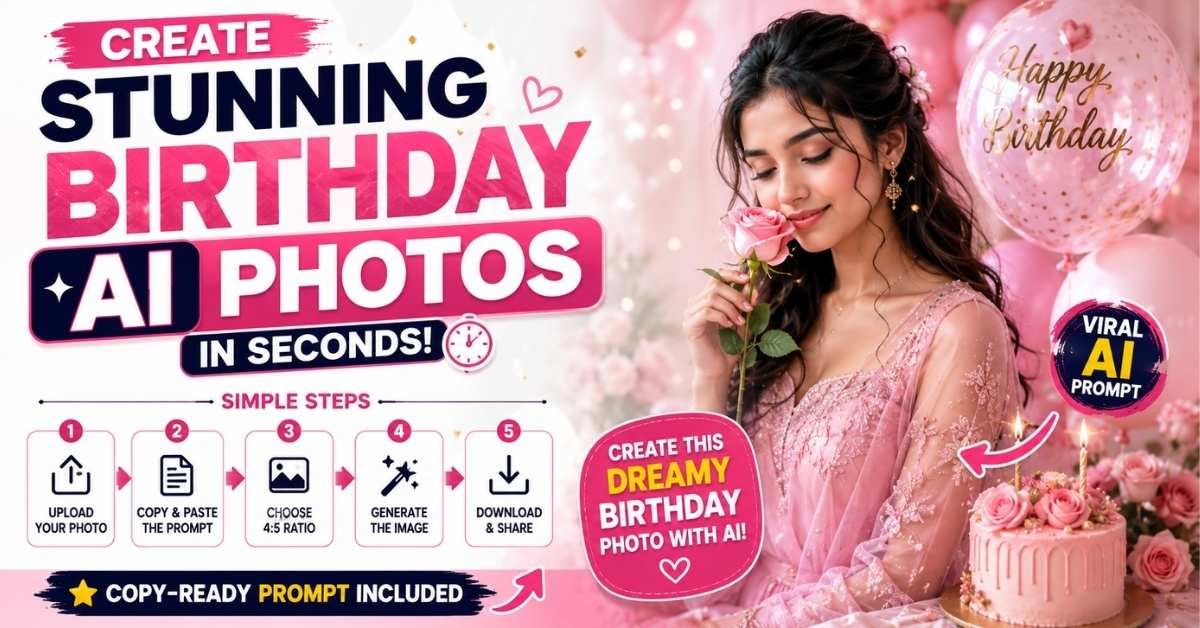
Want to create a beautiful birthday celebration photo using AI? With a simple reference photo and the right prompt, you can turn an ordinary picture into a dreamy, professional-looking birthday poster. The prompt below is designed around a soft pink-and-white aesthetic, natural pose, elegant styling, and realistic details. The original uploaded image contains the core prompt concept and visual instructions.
5 Lines: How to Create AI Images for Shorts
- Open your favorite AI image generator that supports reference images.
- Upload the photo you want to use as the facial/reference image.
- Copy the birthday AI image prompt given below and paste it into the tool.
- Select a 4:5 vertical ratio and generate the image.
- Download the best result and use it in your YouTube Short, Instagram Reel, or Facebook video.
Step-by-Step Guide to Create the Birthday AI Photo
Step 1: Choose a Good Reference Photo
Select a clear, high-quality portrait where the person’s face is visible. A well-lit image generally gives AI tools a better visual reference.
Step 2: Upload Your Reference Image
Open an AI image-generation tool that supports image references. Upload your selected photo and make sure it is being used as the subject/reference image.
Step 3: Add the AI Prompt
Copy the complete prompt below and paste it into the image generator. It describes the composition, pink aesthetic, pose, outfit, lighting, and birthday-poster style.
Step 4: Generate a 4:5 Image
Choose a 4:5 vertical aspect ratio. This format works particularly well for Instagram posts, Pinterest-style graphics, and social-media content.
Step 5: Select the Best Result
Generate a few variations if the tool allows it. Choose the image with the most natural face, realistic hands, clean composition, and attractive lighting.
Copy-Ready Birthday AI Photo Prompt
Create an ultra-realistic, high-quality vertical birthday celebration portrait/poster in a soft, dreamy feminine pink-and-white aesthetic.

REFERENCE IMAGE INSTRUCTION:
Use the uploaded reference image as the primary visual reference for the subject. Preserve the subject's recognizable facial features, facial structure, skin tone, hairstyle, hair texture, eyebrows, eyes, nose, lips, jawline, natural proportions, and authentic expression. Keep the person's appearance natural and realistic. Do not unnecessarily beautify, reshape, age, de-age, or change the facial structure.

COMPOSITION:
Create a vertical 4:5 birthday portrait poster. Position the subject slightly toward the right side of the frame, shown approximately from the waist/chest upward. Give her a graceful and natural pose. She is gently holding a single delicate light-pink rose close to her face with one hand. Her head is slightly tilted, creating a soft, elegant and feminine mood.

OUTFIT:
Dress the subject in an elegant, sophisticated outfit that complements the soft pink-and-white birthday theme. The clothing should look realistic, premium, tasteful, and naturally fitted. Add subtle refined details without making the outfit overly dramatic.

BACKGROUND:
Create a dreamy pink-and-white background with a soft pastel gradient, delicate glowing highlights, subtle blurred decorative elements, and an elegant birthday atmosphere. Keep the background clean and premium so the subject remains the main focus.

LIGHTING:
Use soft diffused studio lighting with gentle highlights on the face and hair. Add subtle warm glow and realistic shadows. The skin should have natural texture and realistic details rather than an artificial plastic appearance.

PHOTOGRAPHY STYLE:
Ultra-realistic professional portrait photography, high-end editorial birthday photoshoot, realistic skin texture, natural facial details, sharp eyes, detailed hair strands, realistic hands, realistic rose petals, soft depth of field, cinematic bokeh, premium photography quality.

COLOR PALETTE:
Soft blush pink, pastel pink, white, cream, and subtle warm highlights. Maintain a harmonious feminine color palette throughout the image.

TYPOGRAPHY:
Add elegant minimal birthday typography in the composition, such as:
"HAPPY BIRTHDAY"
Use clean, sophisticated lettering that blends naturally into the poster design without covering the subject's face.

FINAL QUALITY:
Photorealistic, highly detailed, natural proportions, realistic anatomy, professional composition, cinematic softness, premium birthday poster aesthetic, crisp details, beautiful depth of field, polished but natural finish.

NEGATIVE INSTRUCTIONS:
Avoid distorted facial features, different identity, unrealistic skin, excessive beauty filters, plastic skin, deformed hands, extra fingers, missing fingers, duplicate objects, distorted eyes, asymmetrical facial features, blurry face, low resolution, oversaturated colors, messy background, unnatural pose, warped clothing, and excessive text.
Tips for Better AI Birthday Photos
- Use a clear front-facing reference photo whenever possible.
- Avoid very dark or blurry source images.
- Keep the prompt unchanged if you want consistent results.
- If the face looks different, strengthen the reference-image instructions.
- Generate multiple versions and select the most natural-looking result.
- For Shorts and Reels, you can animate the final image later using an AI video tool.
Final Thoughts
Creating a professional-looking birthday portrait no longer requires an expensive photoshoot. A good reference image, the right AI birthday photo prompt, and a suitable image generator can produce an attractive social-media-ready design in just a few steps. The pink-and-white concept is especially useful for creating elegant birthday posts, Shorts thumbnails, Instagram content, and personalized celebration graphics.
ALSO READ
Create a Stunning Birthday AI Photo From Your Picture: Viral Cinematic Prompt 2026
Butterfly AI Photo Editing Prompt: Create a Dreamy Saree Portrait
Gemini AI Couple Photo Prompts: Create Stunning Radha Krishna Love Photos