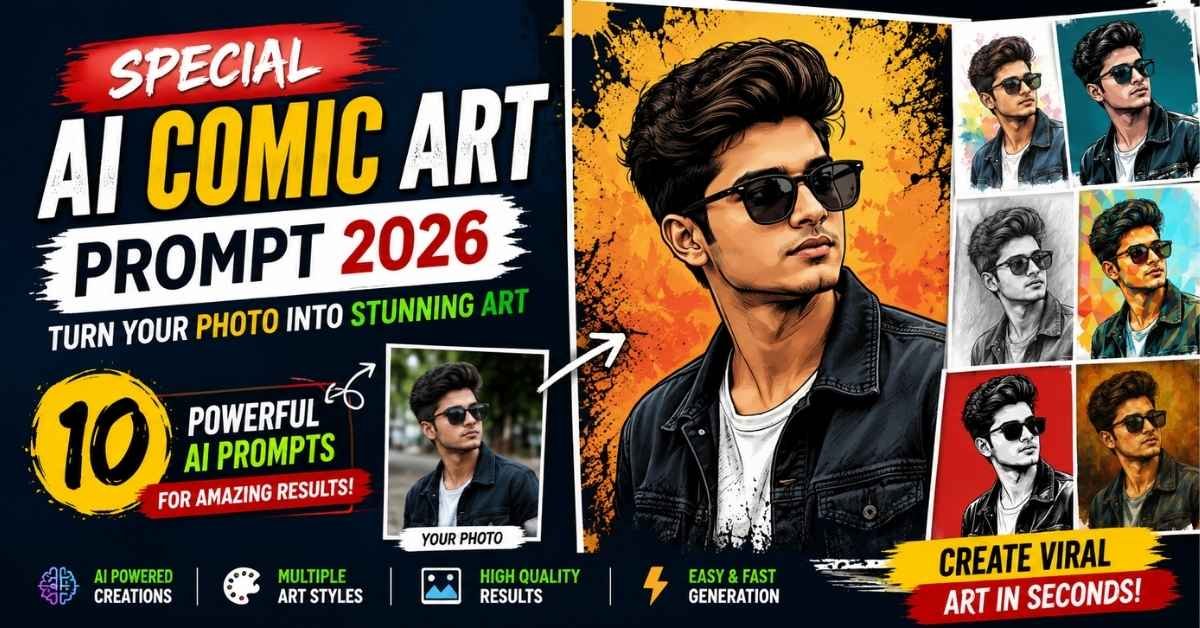
AI image generation has made photo editing much more creative and accessible. With the right prompt, you can turn an ordinary portrait into a stylish comic illustration, digital artwork, sketch, watercolor painting, or professional poster without needing advanced editing skills.
The Special AI Comic Art Prompt 2026 trend is perfect for creators who want to give their photos a unique illustrated look while keeping the person recognizable. You can use these prompts with AI image-generation tools such as ChatGPT, Google Gemini, and other compatible platforms.
In this guide, you will find 10 different AI comic art prompts, along with a simple step-by-step method to create your own artwork.
How to Create AI Comic Art from Your Photo
Creating a comic-style AI image is quite simple. You only need a clear photo, a suitable prompt, and an AI image-generation tool.
Step 1: Choose an AI Comic Art Prompt
Scroll through the prompts below and select the style you like. There are different options, including vector art, comic-book ink, charcoal, watercolor, oil painting, and line art.
Step 2: Open an AI Image Generator
Open ChatGPT, Google Gemini, or another AI image-generation platform that supports image editing.
Step 3: Upload Your Photo
Upload a clear, high-resolution portrait. A front-facing image with good lighting generally works best because the AI can understand facial features more accurately.
Step 4: Paste the Prompt
Copy your selected prompt and paste it into the AI tool along with your reference image.
Step 5: Generate the Artwork
Submit the request and allow the AI to process your image. Depending on the tool and image complexity, the result may take a little time.
Step 6: Check and Save the Final Image
Review the generated artwork carefully. If some facial details, clothing elements, or background features are not correct, refine the prompt and generate another version.
10 Special AI Comic Art Prompts for 2026
Below are 10 ready-to-use prompts for creating different comic and artistic portrait styles.
Prompt 1: Premium Vector Art Portrait
Create a premium modern vector portrait using the uploaded reference image as the only identity reference. Preserve the subject’s facial identity, face shape, eyes, eyebrows, nose, lips, jawline, hairstyle, beard, skin tone, facial proportions, accessories, and natural expression. Do not redesign, beautify, or change the person’s identity.
Transform the photograph into a clean professional vector illustration with bold black contour lines, smooth flat color areas, geometric shapes, subtle layered shadows, and carefully placed highlights. Add detailed hair strokes, refined beard texture, realistic accessory details, and natural clothing folds.
Use a sophisticated color palette featuring deep teal, dark navy, warm skin tones, and soft cream accents. Place the subject against a solid dark teal background with minimal texture and strong negative space.
Premium editorial poster style, clean edges, balanced composition, high-resolution digital artwork, polished finish, no text, no logo, no watermark.
Prompt 2: Comic Book Ink and Digital Fusion
Transform the uploaded reference photo into a premium comic-book ink and digital illustration while using the original image as the only identity reference. Preserve the exact facial structure, facial identity, skin tone, proportions, hairstyle, and natural expression.
Create a hand-inked graphic-novel appearance with bold black outlines, fine pen strokes, cross-hatching, stippling, expressive sketch details, and dramatic graphic shadows.
Combine traditional ink details with clean digital color blocks, subtle gradients, controlled highlights, and cinematic depth. Add detailed hair strokes and strong graphic folds to the clothing.
Use a deep red background with minimal artistic elements and strong contrast. Premium modern comic-book aesthetic, editorial poster composition, crisp edges, highly detailed digital artwork, 4K quality, no text, no watermark.
Prompt 3: Graphite and Digital Art Fusion
Create a sophisticated mixed-media portrait from the uploaded reference image. Use the reference photo as the only identity source and preserve the exact facial structure, eyes, eyebrows, nose, lips, jawline, hairstyle, skin tone, proportions, and natural expression.
Combine realistic graphite pencil drawing with refined digital painting. Add detailed pencil contours, cross-hatching, soft graphite shadows, subtle color accents, smooth highlights, and controlled artistic textures.
Keep the face primarily monochrome while introducing muted tones to the clothing and background. Add minimal abstract brush strokes and geometric design elements around the subject.
Modern art-gallery aesthetic, elegant editorial composition, realistic hand-drawn texture, sharp facial details, clean negative space, premium artwork, no text, no watermark.
Prompt 4: Pen and Digital Art Portrait
Create a premium pen-and-digital-art fusion portrait using the uploaded reference photo as the only identity reference. Preserve the subject’s exact facial identity, facial structure, eyes, eyebrows, nose, lips, jawline, hairstyle, skin tone, proportions, and natural expression.
Recreate the portrait using ultra-fine black ink outlines, expressive cross-hatching, stippling, sketch strokes, detailed hair lines, and controlled ink shadows. Blend the traditional pen artwork with subtle digital gradients, soft highlights, atmospheric glow, and refined tonal accents.
Keep the face primarily ink-based and highly detailed while adding selected digital colors to the clothing and background. Include minimal abstract ink splashes and geometric elements.
Cinematic editorial artwork, sophisticated mixed-media appearance, sharp details, high resolution, professional composition, no text, no watermark.
Prompt 5: Modern Artistic Vector Portrait
Transform the uploaded photograph into a premium artistic vector portrait while using the reference image as the only identity source. Preserve the person’s face, facial structure, eyes, eyebrows, nose, lips, jawline, hairstyle, skin tone, proportions, and natural expression.
Create a sophisticated modern vector illustration using clean geometric shapes, precise outlines, smooth gradients, subtle shadows, sharp edges, and elegant color blocking.
Add fine vector details to the hair and clothing while keeping the face highly recognizable. Use a minimal luxury background with abstract geometric elements, soft lighting accents, and balanced negative space.
Professional digital illustration, crisp contours, premium editorial style, vibrant but tasteful colors, polished composition, high resolution, no text, no watermark.
Prompt 6: Dramatic Charcoal Sketch Portrait
Create a highly detailed charcoal sketch portrait from the uploaded reference photo. Use the reference as the only identity source and preserve the subject’s exact facial identity, face shape, eyes, eyebrows, nose, lips, jawline, hairstyle, proportions, and natural expression.
Recreate the portrait using realistic charcoal strokes, graphite shading, deep blacks, delicate highlights, visible paper texture, cross-hatching, soft smudging, and carefully controlled edges.
Emphasize realistic facial depth while maintaining authentic hand-drawn imperfections. Place the artwork on an off-white textured sketchbook-paper background with subtle charcoal dust around the edges.
Fine-art gallery quality, dramatic monochrome appearance, expressive hand-drawn texture, highly detailed, realistic charcoal artwork, no color, no text, no watermark.
Prompt 7: Elegant Watercolor Portrait
Transform the uploaded reference photo into an elegant hand-painted watercolor portrait while using the original image as the only identity reference. Preserve the subject’s facial identity, facial proportions, eyes, eyebrows, nose, lips, jawline, hairstyle, skin tone, and natural expression.
Use delicate watercolor washes, transparent pigment layers, soft brush edges, natural color bleeding, subtle paper grain, and authentic hand-painted textures.
Keep the face detailed and recognizable while allowing the clothing and background to have a softer watercolor appearance. Create a clean white textured-paper background with gentle abstract paint splashes and subtle botanical elements.
Refined fine-art portrait, gallery-style composition, natural lighting, artistic yet realistic appearance, harmonious colors, high detail, no text, no watermark.
Prompt 8: Low-Poly Geometric Portrait
Create a premium low-poly geometric portrait using the uploaded reference image as the only identity reference. Preserve the subject’s exact facial identity, face shape, eyes, eyebrows, nose, lips, skin tone, proportions, hairstyle, accessories, and natural expression.
Transform the photograph into a sophisticated low-poly digital illustration using hundreds of geometric facets, sharp planes, angular contours, clean vector edges, and layered tonal shading.
Apply realistic light and shadow across the face and hair while maintaining the distinctive polygonal style. Add subtle highlights to accessories and clothing.
Use a bright minimalist background with strong negative space and a premium poster aesthetic. Crisp edges, high contrast, vibrant but natural skin tones, detailed geometric hair facets, professional digital artwork, 4K quality, centered composition, no text, no watermark.
Prompt 9: Classical Oil Painting Portrait
Create a luxurious classical oil-painting portrait based on the uploaded reference photo. Use the image as the only identity reference and preserve the subject’s exact facial identity, face shape, eyes, eyebrows, nose, lips, jawline, hairstyle, skin tone, proportions, and natural expression.
Recreate the portrait with realistic oil-paint brushwork, layered pigments, natural skin tones, subtle canvas texture, soft highlights, deep shadows, and smooth color transitions.
Give the clothing elegant painterly details while keeping the face sharply recognizable. Place the subject against a dark sophisticated studio background with subtle atmospheric depth and classic portrait lighting.
Museum-quality fine art, timeless classical portrait composition, cinematic depth, realistic brush texture, highly detailed, premium artwork, no text, no watermark.
Prompt 10: Black Ink Line Art Portrait
Create a sophisticated black-ink line-art portrait using the uploaded reference image as the only identity reference. Preserve the subject’s exact facial identity, facial structure, eyes, eyebrows, nose, lips, jawline, hairstyle, proportions, and natural expression.
Do not change or beautify the facial features. Recreate the portrait using precise flowing ink lines, variable line weight, elegant contour drawing, cross-hatching, stippling, and controlled black-and-white shading.
Make the face highly recognizable with detailed eyes and natural hair texture. Use an ivory paper background with subtle artistic imperfections and a few abstract ink strokes.
Contemporary editorial illustration, handcrafted appearance, premium gallery artwork, dramatic contrast, ultra-detailed monochrome finish, no text, no watermark.
What Is an AI Comic Art Prompt?
An AI Comic Art Prompt is a detailed instruction that tells an AI image generator how you want a photograph to be transformed into an illustrated or comic-inspired artwork.
Instead of simply writing “turn this photo into a comic,” a detailed prompt can describe the exact visual direction, including:
- Facial appearance
- Hairstyle and clothing
- Illustration style
- Line quality
- Lighting
- Shadows
- Background
- Color palette
- Composition
- Artistic texture
- Image quality
- Overall mood
Detailed instructions give the AI a clearer idea of the final image you want.
Why Are AI Comic Portraits Popular?
Comic-style AI portraits can completely change the appearance of an ordinary photograph. They are especially useful for people who want creative profile pictures, social media posts, posters, thumbnails, wallpapers, or personal branding artwork.
A well-written prompt can produce a much more controlled result than simply applying a generic cartoon or comic filter.
The biggest advantage is flexibility. You can experiment with different styles—from clean vector illustrations and graphic novels to charcoal sketches, watercolor paintings, and classical oil portraits.
Tips for Getting Better AI Comic Results
1. Use a Clear Reference Photo
Start with a sharp, well-lit image. Avoid extremely dark, blurry, or heavily filtered photographs.
A high-quality reference gives the AI more visual information about facial features, hair, clothing, and proportions.
2. Describe the Style Clearly
Instead of saying only “make it comic style,” explain what you want.
For example, you can specify:
- Bold ink outlines
- Cross-hatching
- Vector color blocks
- Graphite shading
- Watercolor textures
- Geometric shapes
- Cinematic lighting
The more specific the visual direction, the more predictable the result can become.
3. Avoid Conflicting Instructions
Try not to combine too many unrelated styles in one prompt.
For example, asking for a realistic oil painting, flat vector artwork, watercolor texture, and comic-book ink style simultaneously may produce an inconsistent result.
Choose one primary style and build the prompt around it.
4. Tell the AI to Preserve the Identity
If you want the generated image to remain recognizable, clearly mention that the uploaded photo should be used as the identity reference.
You can specifically instruct the AI to preserve facial structure, hairstyle, skin tone, proportions, and natural expression.
5. Select the Correct Image Ratio
Choose the aspect ratio according to where you plan to use the artwork.
A portrait ratio can work well for Instagram posts, profile pictures, and mobile content, while a landscape format can be useful for YouTube thumbnails, banners, and desktop wallpapers.
Where Can You Use AI Comic Artwork?
Once your image is generated, there are many ways to use it creatively.
Social Media
Create unique Instagram, Facebook, or other social media posts with an illustrated version of your photo.
Profile Pictures
Comic and vector portraits can give your profile a more distinctive visual identity.
YouTube Thumbnails
A dramatic illustrated portrait can make a thumbnail more visually interesting when combined with suitable text and graphics.
Posters
Use your AI artwork for personal posters, event designs, creative projects, or digital artwork.
Wallpapers
High-resolution comic illustrations can also be turned into smartphone or desktop wallpapers.
Personal Branding
Creators, artists, influencers, and bloggers can experiment with consistent illustrated portraits as part of their visual branding.
Creative Portfolios
AI-generated artwork can also be used as inspiration or as part of a digital-art showcase, subject to the terms of the AI platform you use.
Final Words
The Special AI Comic Art Prompt 2026 trend gives you an easy way to experiment with creative portrait editing. Instead of relying on a basic filter, you can control the illustration style, linework, colors, lighting, background, and overall artistic direction through a detailed prompt.
For the best results, start with a clear reference photo, choose one specific art style, and make your instructions consistent. If the first result is not perfect, adjust the prompt and try again.
Whether you prefer comic-book ink, vector art, charcoal sketches, watercolor, low-poly designs, oil paintings, or black-ink line art, these prompts can help you explore different AI portrait styles and create artwork that stands out.
Try your favorite prompt today and give your ordinary photo a completely new artistic look.
ALSO READ :-15 August AI Poster Prompts 2026: Create Stunning Patriotic Photos
15 August Cinematic Video Prompt 2026: Turn Your Photo Into a Patriotic AI Video