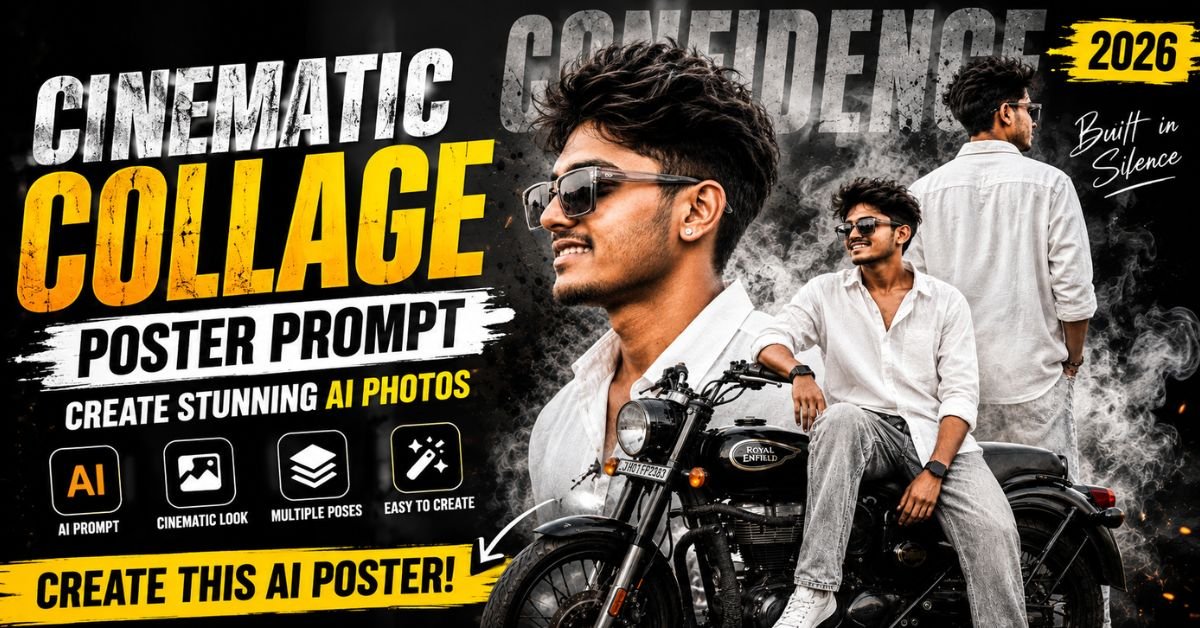
Creating a stylish cinematic poster no longer requires advanced Photoshop skills or hours of complicated editing. With the right Cinematic Collage Poster Prompt, you can turn a simple portrait into a premium-looking fashion poster featuring multiple poses, dramatic lighting, smoky backgrounds, bold typography, and even a motorcycle or other lifestyle elements.
AI image generation has made creative poster design much easier for beginners, creators, photographers, influencers, and social media users. Instead of manually combining several photographs, you can describe the complete composition in a detailed prompt and let an AI image tool generate the concept.
In this guide, you will learn what a Cinematic Collage Poster Prompt is, how to create one, popular styles, useful examples, practical tips, and where you can use your finished poster.
What is Cinematic Collage Poster Prompt?
A Cinematic Collage Poster Prompt is a detailed text instruction used with an AI image-generation or editing tool to create a cinematic poster containing multiple visual compositions of the same person or subject.
For example, one poster can include:
- A large side-profile portrait
- A rear-view standing pose
- A full-body fashion pose
- A person sitting on a motorcycle
- Dramatic smoke and shadows
- Grunge or ink-splash textures
- Cinematic typography
- Professional fashion-editorial lighting
The main purpose is to tell the AI exactly how the subject, clothing, background, lighting, camera style, composition, and typography should look.
A detailed prompt generally produces more controlled results than a very short instruction.
How to Create a Cinematic Collage Poster Prompt
Creating your own prompt is easier when you build it step by step.
Step 1: Describe the Subject
Start by explaining who or what should appear in the poster.
For example:
“A stylish young South Asian man with a warm smile, medium-brown skin tone and transparent grey rectangular sunglasses.”
If you are editing a personal photograph, mention that the facial identity should remain consistent.
Step 2: Add Clothing Details
Describe the complete outfit, including colors and accessories.
For example:
“Oversized white linen shirt with the top buttons open, light grey relaxed-fit jeans, white sneakers, black smartwatch and silver stud earrings.”
Specific clothing details help maintain a consistent fashion concept.
Step 3: Define the Collage Composition
Tell the AI how many compositions you want.
You can request a large side-profile portrait, a rear-view pose and a smaller full-body motorcycle pose.
Step 4: Describe the Background
A cinematic background can dramatically change the appearance of the poster.
Try elements such as:
- Smoky atmosphere
- Dark grunge texture
- Black ink splashes
- Subtle fog
- Concrete textures
- Dramatic shadows
Step 5: Add Lighting and Camera Details
Mention the visual quality you want, such as HDR lighting, shallow depth of field, dramatic contrast and an 85mm DSLR-style look.
Step 6: Specify the Aspect Ratio
For Instagram-style posters, vertical formats can work well. If you need a 4:5 composition, clearly mention:
“Vertical 4:5 aspect ratio.”
Best Cinematic Collage Poster Prompt Examples
Prompt 1: Luxury Fashion Editorial
Create an ultra-realistic cinematic vertical collage poster featuring the same stylish young South Asian man in three dynamic compositions. Preserve consistent facial identity, warm smile, natural skin texture and transparent grey rectangular sunglasses. He wears an oversized white linen shirt with the top buttons open, light grey relaxed-fit jeans, white sneakers, a black smartwatch and silver stud earrings. Include a large side-profile portrait, rear-view standing pose and full-body seated pose on a black classic motorcycle. Use a smoky grunge background, black ink splashes, subtle fog, dramatic shadows and premium fashion-editorial styling. Add bold faded “CONFIDENCE” typography and small handwritten “Built in Silence” text. Soft HDR lighting, dramatic contrast, shallow depth of field, crisp details, realistic skin texture, DSLR 85mm lens look, cinematic color grading, sharp focus, vertical 4:5 composition.
This style is ideal for fashion, lifestyle and personal branding posters.
Prompt 2: Dark Streetwear Style
Create a high-end cinematic collage poster of the same young South Asian man wearing an oversized black streetwear shirt, relaxed light-grey jeans, white sneakers and transparent rectangular sunglasses. Show three coordinated poses: dramatic side profile, rear-view standing shot and confident full-body pose beside a black motorcycle. Use a dark urban background with smoke, concrete textures, black ink splashes and subtle cinematic grain. Add oversized distressed “CONFIDENCE” text and handwritten “Built in Silence” typography. Ultra-realistic photography, soft rim lighting, deep shadows, HDR details, 85mm lens, premium street-fashion editorial aesthetic, sharp focus, 4:5 vertical poster.
Prompt 3: Minimal Luxury Concept
Design a premium cinematic fashion collage featuring the same stylish young man in three carefully balanced compositions. Use a clean charcoal-grey background with soft smoke, subtle grain and minimal ink textures. Include a large side-profile portrait, rear-view pose and full-body motorcycle composition. White linen shirt, light-grey jeans, white sneakers, transparent grey sunglasses and silver earrings. Use soft studio lighting, realistic skin texture, subtle shadows, elegant contrast and luxury magazine photography. Add faded “CONFIDENCE” lettering with “Built in Silence” in handwritten script. Ultra-realistic, DSLR photography, 85mm lens, cinematic color grading, vertical 4:5 aspect ratio.
Prompt 4: Gritty Motorcycle Poster
Create an ultra-realistic cinematic motorcycle fashion poster featuring the same young South Asian man in three connected poses. Include an oversized close-up side profile, rear-view standing pose and relaxed full-body pose sitting on a black classic motorcycle. Add smoky fog, black ink splatters, dusty ground, gritty textures and dramatic backlighting. Keep the face, hairstyle, sunglasses and clothing consistent across all three compositions. Use white linen shirt, light grey jeans and white sneakers. Add bold faded “CONFIDENCE” text and handwritten “Built in Silence.” Premium automotive-fashion editorial style, realistic photography, HDR lighting, strong contrast, shallow depth of field, 85mm DSLR look, sharp details, 4:5 composition.
Prompt 5: Social Media Editorial Poster
Create a premium social-media-ready cinematic collage poster featuring the same fashionable young South Asian man in three dynamic poses. Maintain consistent identity and realistic facial details. Include a large side portrait, rear-view standing pose and full-body motorcycle pose. Use a smoky black-and-grey grunge background with artistic ink splashes. Add bold faded “CONFIDENCE” typography and small handwritten “Built in Silence.” Fashion editorial photography, realistic skin, soft HDR lighting, dramatic contrast, shallow depth of field, crisp details, cinematic color grading, sharp focus, professional DSLR 85mm lens appearance, vertical 4:5 format.
Why Cinematic Collage Poster Prompt Is Popular in 2026
The format is becoming increasingly useful for creators because it combines several visual ideas into one powerful design.
- Multiple poses in one image — One poster can tell a complete visual story.
- Social media friendly — Vertical 4:5 designs can work well for many social platforms.
- Strong personal branding — Consistent clothing, colors and typography can create a recognizable visual identity.
- Less manual editing — AI can help generate complex compositions that would otherwise require multiple editing steps.
- Fashion-editorial appearance — Cinematic lighting and layered compositions can make ordinary portraits look more polished.
Popular Styles and Features
Fashion Editorial
Uses luxury lighting, clean compositions and magazine-style photography.
Dark Grunge
Combines smoke, distressed textures, ink splashes and dramatic shadows.
Motorcycle Cinematic
Adds motorcycles, roads, headlights and atmospheric backgrounds for a powerful lifestyle look.
Minimal Luxury
Uses fewer background elements and focuses attention on the subject.
Streetwear Poster
Combines urban fashion, bold typography and dramatic photography.
Benefits of Using Cinematic Collage Poster Prompt
- Create multiple visual compositions in one poster.
- Experiment with different fashion styles quickly.
- Produce eye-catching social media artwork.
- Build consistent personal branding.
- Create concepts without advanced graphic-design skills.
- Combine photography, typography and cinematic effects.
Tips for Better AI Poster Results
- Describe the subject before describing the background.
- Clearly mention that facial identity should remain consistent when using a reference image.
- Keep clothing descriptions identical across all poses.
- Specify the number of compositions you want.
- Mention the exact aspect ratio.
- Avoid adding too many unrelated visual elements.
- Use camera and lighting descriptions for a more photographic appearance.
- Check generated typography because AI-generated text may sometimes require correction in an editor.
Where Can You Use It?
A cinematic collage poster can be useful for:
- Instagram posts and Reels covers
- Facebook posts
- YouTube thumbnails or community posts
- Pinterest graphics
- Personal portfolios
- Fashion and lifestyle pages
- Motorcycle-themed social media content
- Personal branding campaigns
Frequently Asked Questions
Q1. What is Cinematic Collage Poster Prompt?
It is a detailed AI instruction for generating a cinematic poster containing multiple coordinated images or poses of a subject.
Q2. How can I use Cinematic Collage Poster Prompt?
Copy a suitable prompt into your preferred AI image-generation or editing tool and add your reference photo when the tool supports image references.
Q3. Is Cinematic Collage Poster Prompt free?
The prompt itself is simply text and can be created without purchasing anything. Whether image generation is free depends on the AI platform you choose and its current plans.
Q4. Which tool is best for creating cinematic posters?
There is no single best tool for everyone. Choose an image-generation or editing platform that supports reference images, detailed prompting and the aspect ratio you need.
Q5. Can beginners use these prompts?
Yes. Beginners can copy a complete prompt and then change simple details such as clothing, background, pose and typography.
Q6. How can I get better results?
Use a clear reference image, provide specific descriptions, maintain consistent clothing details and avoid making the prompt unnecessarily complicated.
Conclusion
A well-written Cinematic Collage Poster Prompt can turn a simple portrait idea into a dramatic fashion-editorial composition. The key is to describe the subject, clothing, poses, background, lighting, typography and camera style clearly.
If you want a consistent result, keep the person’s appearance and outfit descriptions the same throughout the prompt. You can then experiment with grunge, luxury, streetwear or motorcycle themes to create your own unique poster style.
ALSO READ :-Special AI Comic Art Prompt 2026: Turn Your Photo Into Stunning Art
15 August AI Poster Prompts 2026: Create Stunning Patriotic Photos