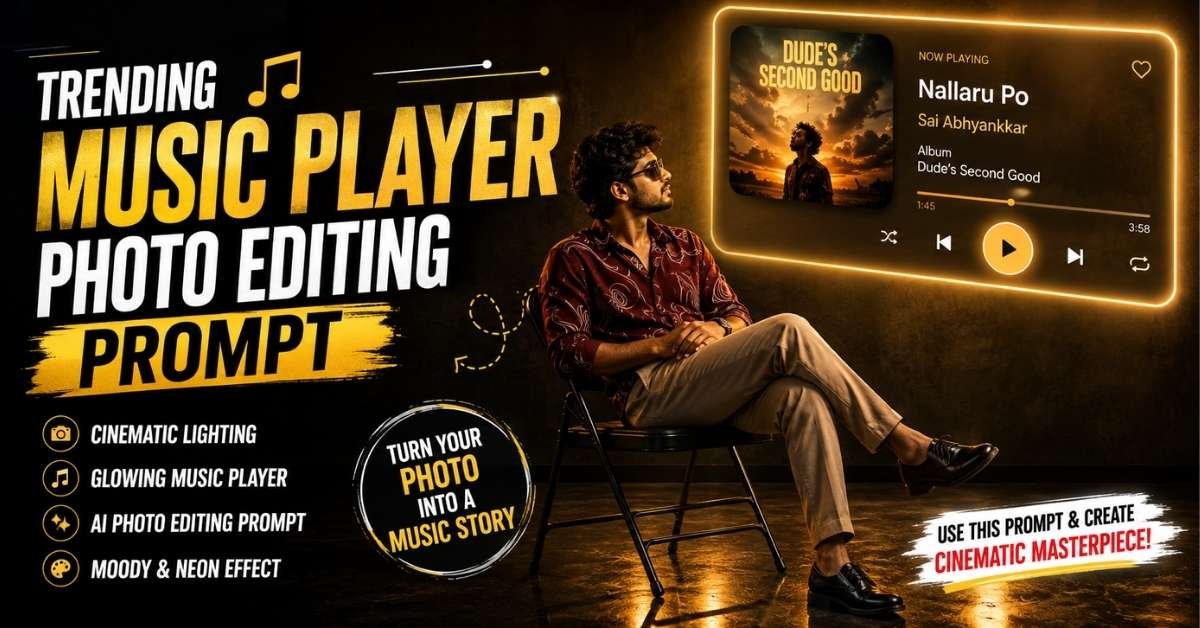
AI photo editing is becoming more creative than ever, and cinematic Music Player Photo are currently a great way to give an ordinary photograph a premium editorial look. The concept shown in the uploaded references combines a dark studio, warm amber neon lighting, a stylish seated pose, and a glowing music-player interface for a dramatic result.
The same visual concept can also be adapted for a female portrait, featuring a relaxed seated pose, long flowing hair, elegant casual clothing, and a warm cinematic atmosphere.
In this guide, you’ll find ready-to-use AI photo editing prompts for both male and female portraits.
What Is the Cinematic Music Player Photo Trend?
This editing style transforms a normal portrait into a scene that looks like it was captured from a stylish music video or premium magazine shoot.
The main visual elements include:
- Dark minimalist studio background
- Warm amber and golden neon lighting
- Subject sitting on a black folding chair
- Relaxed crossed-leg pose
- Glowing music-player card on the wall
- Deep shadows and high contrast
- Slightly low camera angle
- Shallow-to-moderate depth of field
- Realistic skin and clothing textures
- Cinematic color grading
- Soft reflections on the floor
For the male version, the reference describes a young man in a maroon printed shirt, beige trousers, black shoes and dark sunglasses, looking toward the glowing music interface.
How to Create This AI Music Player Photo
Creating this type of image is fairly simple. You can use an AI image-generation or photo-editing tool that supports reference images.
Step 1: Choose a Good Photo
Select a clear photograph where your face is visible. A full-body or three-quarter-body image works especially well because the concept relies heavily on the seated pose and clothing.
Step 2: Upload Your Photo
Open your preferred AI image editor and upload the image you want to transform.
Ask the AI to preserve your recognizable facial characteristics while changing the environment, pose, lighting and overall photographic style.
Step 3: Add the Prompt
Copy one of the prompts below and paste it into the AI tool.
Step 4: Generate the Image
Let the AI create the cinematic composition. If your first result doesn’t have the desired pose or lighting, regenerate it with stronger instructions about the camera angle and composition.
Male Cinematic Music Player Photo Editing Prompt
Copy this prompt:
EnterCreate an ultra-realistic cinematic editorial portrait using my uploaded photo as the identity reference. Preserve my facial features, skin tone, hairstyle, body proportions and natural appearance. Show me seated naturally on a simple black folding chair in a dark minimalist studio. Keep my legs crossed and hands relaxed in my lap, with my body positioned toward the left side of the frame. I am looking toward the upper-right side at a glowing music-player interface mounted on the wall. Dress me in a stylish maroon printed shirt, beige trousers, black shoes and dark sunglasses. Create a warm amber and golden neon atmosphere with deep shadows and dramatic contrast. The wall should feature a premium glowing music-player card with rounded corners, album artwork on the left and playback information and controls on the right. Display the track “Nallaru Po” from the album “Dude’s Second Good” by Sai Abhyankkar. Use soft neon rim lighting around my face and hair, subtle golden reflections on the polished floor, volumetric light and realistic shadows. Shoot from a slightly low angle with full-body framing, placing the subject on the left third and the glowing music player on the upper-right third. 35mm photography look, realistic lens depth, cinematic color grading, ultra-detailed textures, natural skin, realistic fabric folds, photorealistic lighting, premium editorial photography, high contrast, moody atmosphere, professional studio quality.
The male reference specifically uses a 35mm-style photographic look, full-body framing and a composition that places the subject on the left while the illuminated music card occupies the upper-right area.
Female Cinematic Music Player Photo Editing Prompt
You can also create a female version of the same trend.
Copy this prompt:
Create an ultra-realistic cinematic editorial portrait using my uploaded photo as the identity reference. Preserve my facial identity, natural skin tone, facial features, hairstyle and body proportions. Show me seated comfortably on a black folding chair inside a dark minimalist studio. Keep my legs crossed and arms gently folded, with my head turned toward the right as I calmly look at a glowing music-player display on the wall. Give me long, wavy dark hair falling naturally over my shoulders and a calm, introspective expression. Dress me in a deep maroon fitted long-sleeve top with a scoop neckline, beige or khaki relaxed-fit pants and black sneakers. Add a small delicate necklace and subtle earrings. Place a glowing music-player card on the wall in the upper-right portion of the composition. Use rounded corners, a soft neon outline, album artwork on the left and track information with playback controls on the right. Create warm amber neon lighting with deep brown shadows. Add a soft golden rim light around my hair and face and subtle reflections from the neon light on the slightly reflective floor. Use a slightly low eye-level camera angle and a three-quarter profile. Position the subject toward the lower-left area and the glowing player toward the upper-right area. Full-frame DSLR or mirrorless camera look, 50mm prime lens, shallow depth of field, realistic skin texture, detailed hair strands, realistic clothing texture, cinematic color grading, high contrast, moody atmosphere, photorealistic lighting, premium editorial photography.
The female reference emphasizes a 50mm prime-lens aesthetic, three-quarter profile, warm rim lighting and a lower-left/upper-right visual balance.
Tips for a More Realistic Result
For the best output, keep these points in your prompt:
Preserve identity: Tell the AI not to unnecessarily change your facial structure or recognizable features.
Use cinematic lighting: Warm amber light combined with deep shadows creates the signature mood of this trend.
Specify the composition: Mention exactly where the person and music-player display should appear.
Don’t overdo the background: A simple dark studio makes the neon interface and subject stand out.
Add realistic textures: Include details such as natural skin texture, hair strands, fabric folds and realistic floor reflections.
Use camera language: Terms such as 35mm lens, 50mm prime lens, shallow depth of field, low-angle photography can help communicate the desired photographic aesthetic.
Why This Prompt Works
The strength of this concept comes from the contrast between dark surroundings and warm glowing light. Instead of simply changing the background, the prompt describes the complete photographic environment—subject placement, clothing, lighting, camera perspective, music interface and reflections.
That gives the AI enough visual direction to create something that feels more like a professionally produced editorial photograph than a basic AI filter.
Final Thoughts
The cinematic music-player photo trend is a great way to turn a regular portrait into a dramatic, premium-looking image. With a suitable reference photo and the right prompt, you can recreate the dark studio atmosphere, glowing music interface, warm amber lighting and editorial photography style.
Try the male or female prompt above, then experiment with different outfits, songs, neon colors and poses to develop your own version of the trend.
ALSO READ