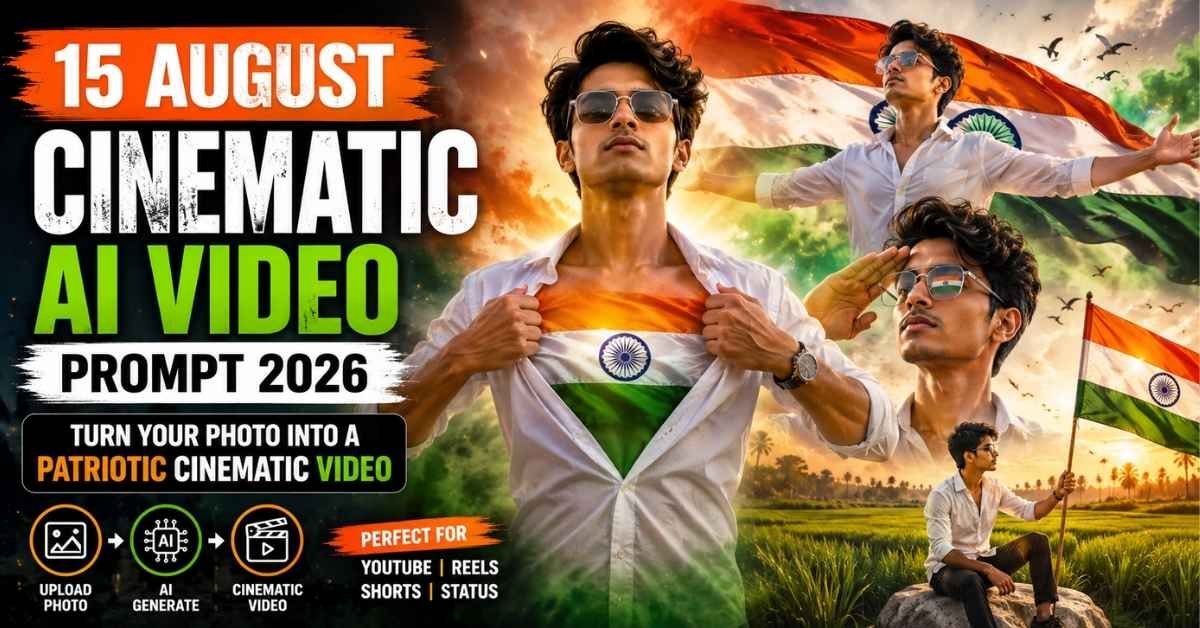
Independence Day is the perfect occasion to create emotional and patriotic videos for social media. With modern AI video tools, you no longer need advanced editing skills or expensive equipment to turn an ordinary portrait into a cinematic 15 August video.
Using the right 15 August Cinematic Video Editing Prompt, you can create a visually impressive Independence Day video with the Indian tricolour, cinematic lighting, realistic wind effects, dramatic camera movements, green fields, flying birds, and emotional patriotic scenes.
In this guide, you will find a complete 15 August AI Video Prompt 2026, along with simple instructions for creating the video from a single photo. You can use the concept for YouTube, Instagram Reels, Facebook, Shorts, status videos, and other social media platforms.
The prompt is designed around a short cinematic sequence where the same person appears consistently throughout the video while the environment and camera angles change from one scene to another.
How to Create a 15 August AI Video
Creating an Independence Day cinematic video with AI is quite simple. You only need a good-quality photo, an AI video generator, and the prompt provided below.
Step 1: Copy the AI Video Prompt
First, copy the complete Master Prompt given in this article. Keep the entire prompt together because the scene-by-scene instructions help the AI understand the desired sequence.
Step 2: Open an AI Video Generator
Open your preferred AI video generation platform and sign in to your account if required.
Step 3: Start a New Video Project
Create a new project and choose the option that allows you to generate a video using a reference image.
Step 4: Upload Your Photo
Upload a clear, high-resolution portrait. A front-facing photo with good lighting will generally provide better facial consistency.
Step 5: Add the Master Prompt
Paste the complete prompt into the video generation box. Select 16:9 if you are creating a landscape video and set the duration to approximately 10 seconds, if supported by your tool.
Step 6: Generate the Video
Start the generation process and wait for the AI tool to create the cinematic sequence. Depending on the platform, this may take some time.
Step 7: Review and Save
Watch the generated video carefully. If the result looks good, export or download it and use it for your Independence Day social media content.
15 August Cinematic AI Video Master Prompt
Below is the complete prompt you can use to create the Independence Day cinematic video:
Use the uploaded reference image as the sole face and character reference. Maintain the same person’s identity throughout the entire video. Preserve the facial structure, hairstyle, skin tone, facial features, glasses, body proportions, and overall appearance consistently in every frame. Do not introduce face changes, identity drift, face swapping, artificial beautification, or unnecessary stylization.
The character wears a premium crisp white shirt with rolled-up sleeves, transparent crystal-clear sunglasses, black trousers, and an elegant luxury wristwatch. Keep the same outfit and appearance throughout the video.
Create an ultra-realistic cinematic Independence Day video in 16:9 with HDR-quality visuals, realistic cloth physics, natural wind simulation, volumetric lighting, shallow depth of field, smooth camera movements, cinematic color grading, realistic environmental details, subtle lens flares, and a premium film-like appearance. Do not add text, logos, captions, or watermarks.
0–3 Seconds: Begin with a dramatic cinematic medium close-up of the young man looking directly into the camera with a confident and proud expression. He slowly holds both sides of his white shirt and opens it from the chest in a dramatic cinematic motion. A glowing Indian National Flag appears inside the chest area and moves naturally like flowing fabric. The camera slowly pushes toward the character’s face and chest. Saffron, white, and green smoke moves through the background while warm golden sunlight, floating dust particles, subtle lens flares, cinematic clouds, and birds flying in the distance create an emotional patriotic atmosphere.
3–6 Seconds: The glowing flag effect gradually disappears as the scene transitions smoothly into a wider cinematic shot. The same character stands confidently with both arms extended outward. A huge Indian National Flag waves dramatically in the background under strong natural wind. Tricolour smoke moves through the sky while birds fly overhead. Golden-hour sunlight creates beautiful volumetric rays. The character’s white shirt reacts naturally to the breeze as the camera performs a slow cinematic orbit around him.
6–8 Seconds: Without changing the character’s identity, hairstyle, clothing, or facial appearance, he slowly raises his right hand and gives a proud salute while looking toward the horizon. The camera moves closer for an emotional facial close-up. The waving Indian flag is clearly reflected in his transparent sunglasses. The giant flag continues moving naturally behind him, surrounded by tricolour smoke, cinematic clouds, flying birds, warm sunlight, and subtle golden lens flares.
8–10 Seconds: Transition smoothly into a peaceful and expansive green agricultural landscape filled with lush paddy fields moving gently in the wind. The same character is sitting naturally on a large white stone while wearing the same white shirt, transparent sunglasses, black trousers, and wristwatch. He holds a large Indian National Flag attached to a wooden flagpole. The camera slowly moves around him and finishes with a close-up of his proud and emotional expression. The flag waves naturally, crops move with the breeze, birds cross the glowing sky, and warm golden sunlight creates a peaceful patriotic ending.
Overall visual style: ultra-realistic, photorealistic, cinematic masterpiece, realistic environmental physics, natural fabric movement, detailed Indian landscape, smooth transitions, realistic lighting, cinematic depth of field, emotional Independence Day atmosphere, premium film-quality visuals, consistent character identity throughout the complete sequence. 🇮🇳
Copy the complete prompt and paste it into your preferred AI video generator.
What Makes This 15 August AI Video Prompt Different?
The main strength of this prompt is that it doesn’t describe just one scene. It creates a short cinematic story divided into four connected sections.
Each section has its own camera movement, environment, character action, lighting, and patriotic elements.
The video combines:
- 🇮🇳 Indian National Flag visuals
- 🎬 Cinematic film-style composition
- 🌅 Warm golden-hour lighting
- 🟠⚪🟢 Tricolour smoke effects
- 🕊️ Birds flying through the sky
- 🌾 Green paddy fields
- 🎥 Smooth camera movements
- 👕 Natural cloth and wind physics
- ✨ Volumetric light and lens flares
- 🕶️ Consistent character appearance
- 📽️ High-quality cinematic visuals
The detailed character instructions are especially useful because AI video generators can sometimes change a person’s face, clothing, or appearance between different shots.
Scene-by-Scene Breakdown
0–3 Seconds: Dramatic Flag Reveal 🇮🇳
The video starts with a close-up of the character. He looks confidently toward the camera before opening his shirt to reveal a glowing Indian tricolour effect.
Saffron, white, and green smoke surrounds the scene while golden sunlight, flying birds, dust particles, and cinematic lighting make the opening visually dramatic.
This scene is designed to immediately grab the viewer’s attention.
3–6 Seconds: The Giant Indian Flag
The camera pulls back into a wider shot as the character extends both arms.
A huge Indian National Flag appears behind him and waves in the wind. Tricolour smoke fills the background while birds fly across the sky.
The camera slowly moves around the character, creating a powerful cinematic effect.
6–8 Seconds: Proud Independence Day Salute
The character raises his right hand and gives a salute while looking toward the horizon.
The camera moves closer to his face, allowing the viewer to see the Indian flag reflected in his sunglasses.
Golden light, clouds, smoke, and the giant waving flag add emotion to this short scene.
8–10 Seconds: Peaceful Green Fields
The final scene changes from the dramatic city-like cinematic environment to a peaceful agricultural landscape.
The character sits on a large white stone while holding the Indian National Flag. Green paddy fields move naturally in the breeze around him.
The camera slowly circles around the character before finishing on his face. Birds fly across the sky and warm sunlight gives the final shot a calm and emotional Independence Day feeling.
Tips for Getting Better AI Video Results
AI-generated videos can vary from one generation to another. These simple tips can help you achieve a more consistent result.
1. Use a Clear Reference Photo
Choose a sharp, high-resolution portrait with the face clearly visible. Avoid heavily blurred, dark, or extremely edited photographs.
2. Keep the Complete Prompt
The prompt contains specific instructions for each part of the 10-second sequence. Removing important scene descriptions may change the final result.
3. Maintain the Same Character
If your AI tool provides character or reference-image controls, use the same reference image throughout the generation process.
4. Select the Right Aspect Ratio
For YouTube and landscape content, 16:9 is a good choice. For Instagram Reels and Shorts, you may need to adapt the concept to a vertical format such as 9:16, depending on the AI tool.
5. Review the Generated Video
AI can sometimes interpret complicated movements differently from what you expect. Watch the final result carefully before posting it.
6. Keep the Patriotic Theme Respectful
When creating Independence Day content, use the Indian National Flag and patriotic elements respectfully and appropriately.
Where Can You Use This 15 August AI Video?
Once your cinematic video is ready, you can adapt it for different platforms and occasions.
Some useful options include:
- YouTube videos
- YouTube Shorts
- Instagram Reels
- Facebook videos
- Independence Day status videos
- WhatsApp status
- Patriotic Instagram posts
- 15 August greeting videos
- Personal social media branding
- Independence Day promotional content
You can also add suitable background music, voice-over, or a short Independence Day message during the final editing stage.
Frequently Asked Questions
Can I create this 15 August video using one photo?
Yes. The prompt is designed around using a single reference image of the character. A clear and high-quality photo can help the AI maintain a more consistent appearance.
What video duration should I use?
The Master Prompt is structured for approximately 10 seconds, with four scenes covering different parts of the video.
Which photo is best for this AI video?
A sharp, well-lit portrait with the person’s face clearly visible is generally the best choice. Avoid images with extreme filters or heavy face obstructions.
Can I use this idea for Instagram Reels?
Yes. You can adapt the concept for Instagram Reels by using a vertical video format if your AI video generator supports it.
Can I use the video on YouTube?
Yes. The cinematic concept can be used for YouTube videos, Shorts, Independence Day greetings, or patriotic content. Make sure any music or other third-party material you add is properly licensed.
Why does the AI sometimes change the face?
AI video generators can struggle with identity consistency, especially when the prompt contains multiple scenes and camera movements. Using a high-quality reference image and clear character-consistency instructions can help reduce these changes.
Final Thoughts
The 15 August Cinematic Video Editing Prompt 2026 gives creators an easy way to turn a simple portrait into a short, emotional Independence Day story.
Instead of manually designing every scene, you can use a structured AI prompt to combine the Indian tricolour, cinematic lighting, realistic wind, dramatic camera movements, green agricultural fields, flying birds, and patriotic moments into one short video.
For the best results, start with a high-quality reference photo and keep the character instructions unchanged. You may also need a few generations to get the camera movements and scene transitions exactly the way you want.
With the right AI video tool and a little creativity, even a simple portrait can become a cinematic 15 August AI video that stands out on social media. 🇮🇳
Happy Independence Day! Jai Hind! 🇮🇳